


A photo booth at a fairground works on the same principle: you choose the backdrop from a board on the wall, step in, and the machine does the rest. OnlyKrab applies that idea to adult video. There is no prompt box for the main product and no timeline to edit. You pick a scene that someone else has already designed, supply a face, and wait for the render.
This review covers the template catalogue, the upload rules, the DUO and photo templates, the character builder, the sign-in wall, the payment options and the full price table on all three billing periods. Every number comes from the site's own pages as they stood in October 2026. No clip was generated for this review, so the quality of the output is not assessed here, and the text says so wherever it matters.
How OnlyKrab Works
The first visit opens with a consent window before anything else loads. It asks the visitor to confirm three things: that they are at least 18, that they will only upload photos of adults who agreed to it and will not create non-consensual deepfakes of real people, and that they alone are responsible for what they generate. One Continue button clears it.
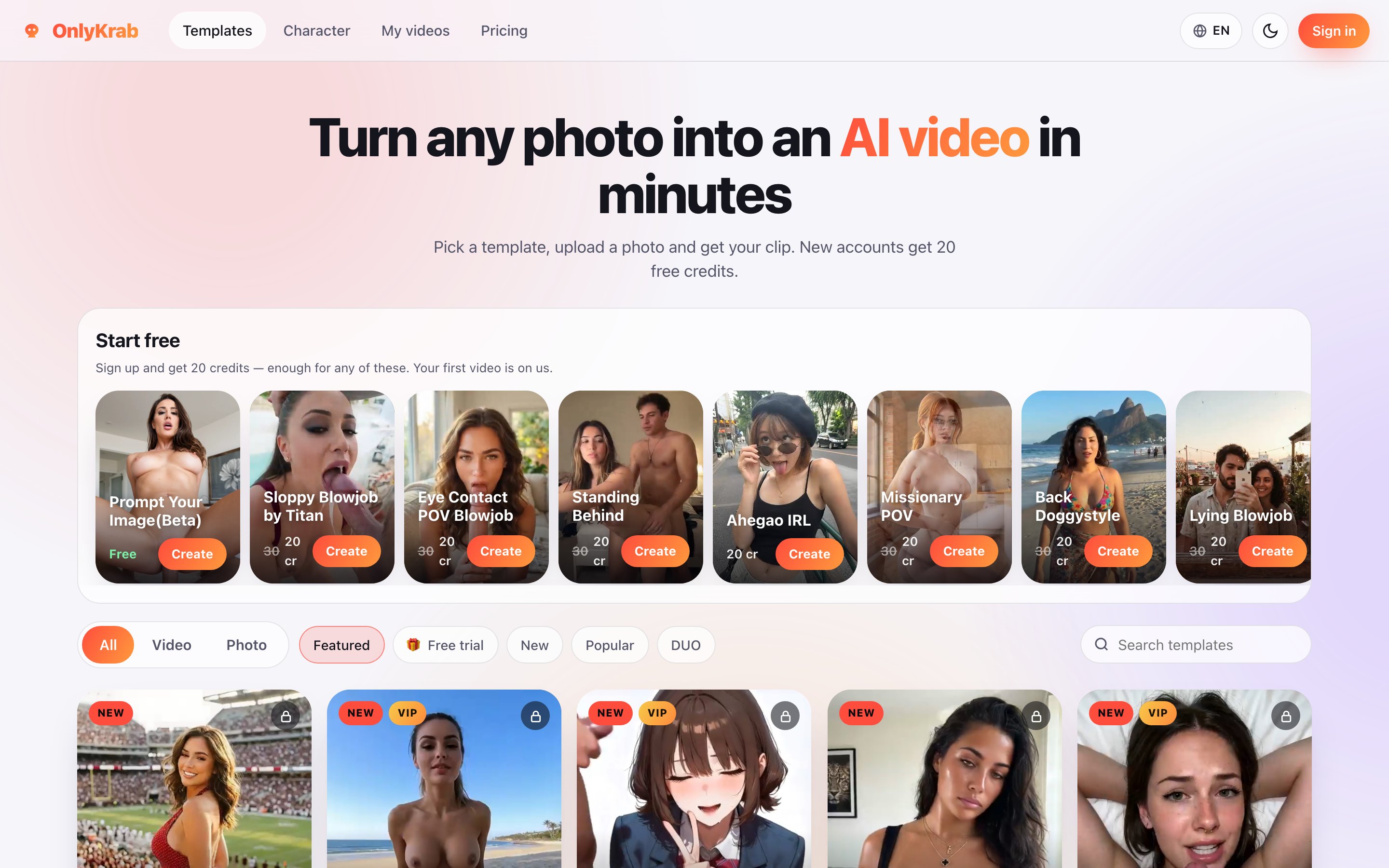
Behind the window sits the homepage, headed "Turn any photo into an AI video in minutes." The workflow promised under it has three steps: pick a template, upload a photo, get your clip. That description is accurate. Each template has its own page with a short instruction, an upload field, a consent checkbox, a quality selector, a length selector and a running total in credits.
The standard instruction reads "Upload a clear photo of one person, facing the camera." Accepted formats are JPEG, PNG and WebP. Below the upload field sits a checkbox stating that everyone in the photo is an adult who agreed to it, and that they hold the right to use the picture.
Pressing Create video in a fresh session does not start a render. It opens a window titled Sign in to continue. Browsing the catalogue, reading template pages and checking prices are all open to anonymous visitors, but generation is not.
Under every Create button the site repeats one promise that matters for a credit system: credits are returned automatically if a generation fails. The terms of service say the same thing.
The Template Library
The catalogue is the product. OnlyKrab claims more than 400 templates, and the homepage lays them out as a grid of preview cards, each showing the name of the scene, its price in credits and a Create button. Badges mark cards as NEW or VIP, and VIP cards carry a padlock in the corner.
Navigation is better than the size of the catalogue might suggest. A three-way switch at the top separates All, Video and Photo. Next to it sit five filters: Featured, Free trial, New, Popular and DUO. A search field on the right finds templates by name. The template names are descriptive rather than clever, which makes search practical: a scene called Missionary POV is exactly what the name says.
Prices are printed on every card. Most video templates cost 30 credits. A handful cost 20, among them Ahegao IRL, Nude Dancing and Wink. The Start free row at the top of the homepage also shows several 30-credit templates marked down to 20, with the old price struck through, so that the welcome balance covers one of them. The row's caption puts it plainly: your first video is on us.
On a template page, quality comes in three steps: Fast at 720p, Medium at 960p and HD at 1020p. Length is 5 seconds on most templates, while some, such as Ahegao IRL, also offer 7 and 10 seconds. The pricing page ties these settings to the plan rather than to the template. Basic allows clips up to 7 seconds in low quality, Pro up to 10 seconds in medium quality, and VIP up to 10 seconds in high quality. A free account sees all three quality buttons on the template page, but what it actually receives at each setting was not tested.
Some template pages add a note about how the scene was built. Ahegao IRL, for instance, is described as "trained on 24 examples." That is a rare piece of candour about the method, though it also hints at how narrow each template's range of motion is likely to be.
The share of locked content is significant. Of the twelve templates labelled NEW on the homepage during research, eight carried the VIP badge. A visitor on a cheaper plan can still choose from a large catalogue, but much of the freshest material is reserved for the top tier.
DUO Templates and Photo Tools
Two kinds of template break the one-photo pattern.
DUO templates are scenes with two people. The upload area on these pages splits into a woman's photo, which is required, and a man's photo, which is optional and costs extra credits. The DUO template checked for this review, Seated Blowjob, carried a VIP badge and the message "This template needs a VIP plan", with the Create button replaced by Unlock with VIP. The DUO filter exists for all users, but at least part of what it shows is out of reach below VIP.
The Photo switch shows templates that return a still image instead of a clip. The plainest of them is Remove background, which replaces the background of an uploaded photo with solid white for 15 credits. It is a utility rather than an adult feature, and a sign that the catalogue is meant to cover the whole job, from the source picture to the finished clip.
The third tool in this group is Prompt Your Image, marked Beta and marked Free. Its page asks for a text description and returns a picture, with the total shown as Free rather than as a number of credits. It is the only part of OnlyKrab that works from words instead of an uploaded photo, and it is the obvious starting point for anyone who does not want to upload a real face at all.
The Character Builder
The Character tab in the main navigation leads to a builder with the tagline "Choose her look, get a photorealistic picture, then animate it with any template." Instead of a prompt, it offers a set of fixed choices.
Ethnicity comes in six options: caucasian, european, asian, black, latina and arab. Hair style offers straight, bangs, curly, bun, short and ponytail, and hair colour offers brunette, blonde, black, redhead and pink. Eyes are brown, blue or green. Body type runs from skinny through athletic, average and curvy to bbw, and breast size from small to xlarge. Eight poses are available, from standing and kneeling to all fours and bent over. Outfits are bikini, lingerie, dress and nude. An age slider rounds it off, set to 25 by default.
One picture costs 10 credits. The builder's own description says the result can be animated with any template, which makes the character builder a second entry point into the same video catalogue.
For a site listed among undress tools, this is the closest OnlyKrab comes to the category's usual feature. There is no dedicated undress button for uploaded photos. The nude outfit in the builder produces an unclothed figure from scratch, and the explicit video templates do the rest with whatever face they are given. The builder has a practical advantage over uploading photos: the subject is invented, so the consent questions that the upload checkbox raises do not apply to it.
Sign-In, Free Credits and Payment
Accounts are created through Telegram, Google or an email address that receives a one-time code. The sign-in window states the offer directly: 20 free credits when you create an account. There is no daily allowance and no recurring free tier beyond that welcome balance and the free Prompt Your Image template.
The interface is available in 13 languages, among them English, Spanish, Portuguese, German, French, Italian, Polish, Turkish, Japanese, Korean, Thai, Vietnamese and Indonesian. A light and dark theme switch sits next to the language menu.
Payment runs through three channels. Cards go through a processor called VoltPay, which the payment screen lists as Visa, Mastercard, PayPal and more. Crypto is accepted with a percentage processing fee added to the price and a network minimum on the amount. Telegram Stars are the third option, and the site notes that, unlike crypto, they have no minimum.
The terms of service are short. They forbid non-consensual intimate imagery and any depiction of minors, and promise an immediate ban and a report to the authorities for either. They also reserve the right to suspend accounts that reverse a payment after receiving credits. The only contact given is support@onlykrab.com, and no company name appears anywhere in the terms.
Pricing Plans and Credits
The pricing page has three billing tabs: Month, 3 months and Year. Month is the default, and on it the plans cost:
Basic is $9.99 a month for 300 credits, clips up to 7 seconds and low quality, with priority over free users in the queue. Pro is $16.99 a month for 700 credits, clips up to 10 seconds in medium quality, faster generation and up to 10 videos rendering at once. VIP is $32.99 a month for 1,500 credits, clips up to 10 seconds in high quality, the VIP-only templates, instant generation, support that answers VIP members first, new templates before anyone else and up to 15 videos at once.
The 3 months tab lowers the monthly rate to $7.99, $13.59 and $26.39, billed as $23.99, $40.79 and $79.19. The Year tab lowers it to $4.99, $8.49 and $16.49, billed as $59.99, $101.99 and $197.99. Credits for a longer term arrive in one block when the payment clears: a three-month Basic plan adds 900 credits at once, not 300 each month.
There is also a one-off pack of 1,000 credits for $24.90, shown against a struck-through $33.00. It needs no plan. The site estimates it at roughly 33 videos.
The arithmetic is worth doing, because the per-clip cost varies more than the headline prices suggest. At 30 credits a clip, monthly Basic buys 10 clips, which works out to about a dollar each. The credit pack buys 33 clips at about 75 cents each, and monthly VIP buys 50 at about 66 cents. In other words, a casual user who wants a few clips gets a better rate from the one-off pack than from the cheapest subscription, and loses only the plan perks: longer clips, higher quality and faster queues.
The pack has a catch, which the pricing page itself explains. Without an active plan, unused credits pause after 30 days without activity. An active plan reactivates them. The pack's own description says that credits never expire while you keep creating, which is the same rule seen from the friendlier side.
The strongest point on this page is in the terms rather than the table. Plans are sold as one-off terms of one, three or twelve months, and they do not renew automatically. On adult AI sites, where forgotten subscriptions are the common complaint, a plan that simply ends is a meaningful difference.
Final Verdict
OnlyKrab is a photo-to-video vending machine, and it is honest about being one. The catalogue is large and easy to search, every template shows its price before you click, failed renders are refunded, and the plans end when their term ends instead of quietly renewing. Those are not small things in a category where hidden costs are the norm.
The limits are just as clear. The free offer is one clip, the cheapest plan caps clips at 7 seconds in low quality, the most interesting new scenes sit behind the $32.99 VIP tier, and nothing outside the template list can be made. Because no clip was generated for this review, whether the renders justify the price remains the open question. The sensible test is the one the site offers: sign up, spend the 20 credits on a single template, and judge the result before buying the credit pack, which is cheaper per clip than monthly Basic. Users who like what they see will find OnlyKrab a fair, transparent way to buy short explicit clips. Users who want open-ended generation should look at prompt-based tools instead.