


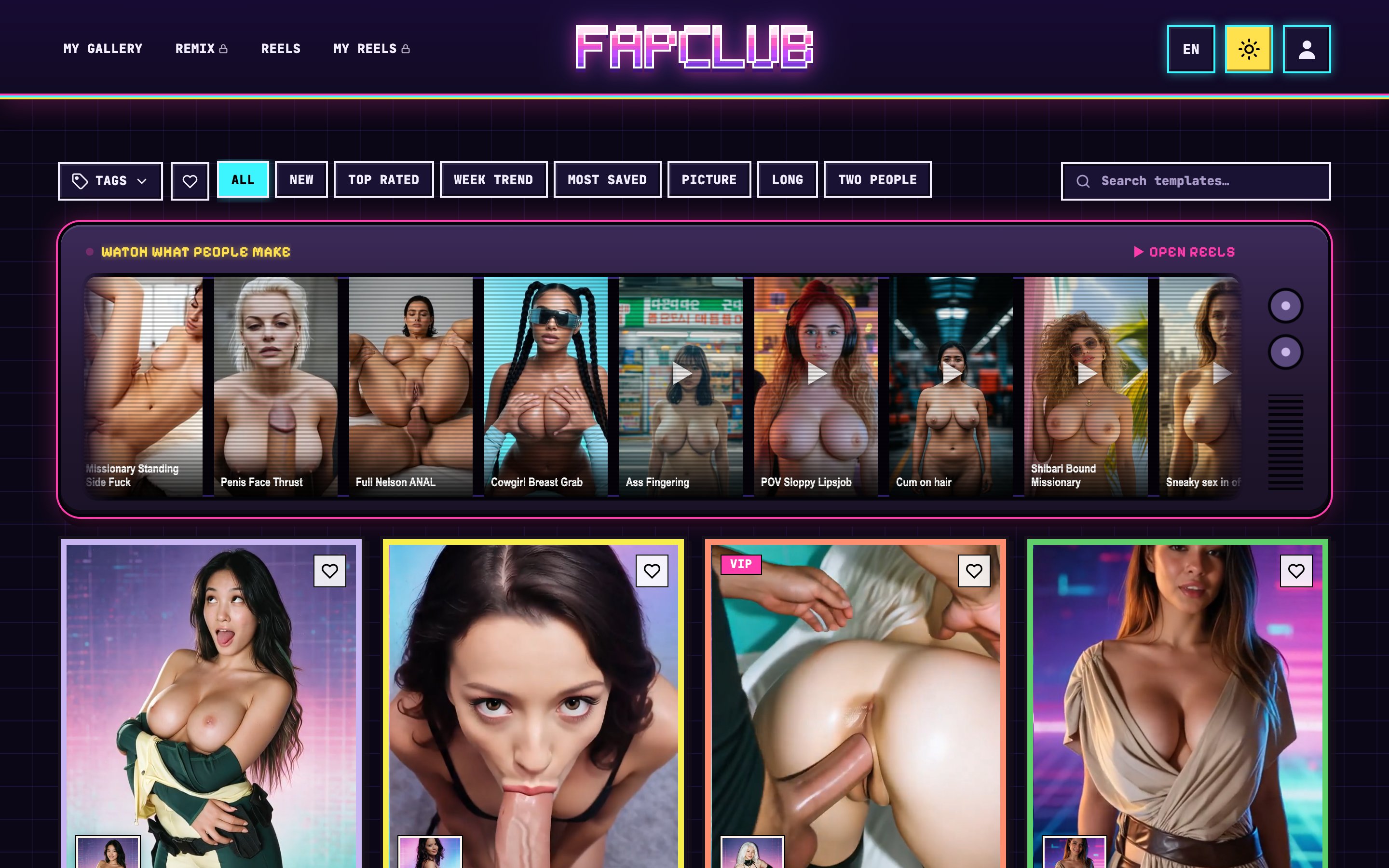
The first thing worth knowing about FapClub is what it does not do. The homepage's search snippet says "describe her and AI draws her for you", yet nothing in the main flow asks for a description. There is no prompt field, no slider for body type and no character builder. What FapClub sells is a catalogue of finished scenes, each with its movement, framing and setting already fixed, and a slot where your photo goes.
This review covers how that catalogue is organised, what the generate window asks for and charges, which parts of the site stay closed until you sign in, how the plans and coin packs add up, and where the pricing page and the terms disagree. Everything here was checked on FapClub's live pages in late October 2026, in a clean browser session viewed from Slovenia. No clip was rendered, so the quality of the finished video is the one question this review leaves open.
What FapClub Actually Makes
Before the catalogue appears, a gate asks for three confirmations at once: adulthood, a promise to use only faces whose owners agreed, and acceptance of sole responsibility for anything made or shared. A single Continue button covers all three.
Behind it sits a grid headed "AI video templates." The explainer page reduces the product to three steps. Pick a scene, add a photo of one person facing the camera, and collect the clip from your private collection a few minutes later. In FapClub's own words, the scene supplies the motion and the backdrop and your picture supplies the person. The interface bears that out. The input is a single still image. There is no video upload, no second reference photo and no step where a model is trained on your face.
Output is mostly video, but not only. A Picture filter in the catalogue points to templates that return a still image, and a Long filter points to scenes that run past the usual length. The landing pages are available in English, Spanish, French, Italian, German and Turkish, and the app itself carries a language switch in the header.
Finding a Scene Among 631 Templates
The page counter puts the catalogue at 631 templates, shown 24 at a time across 27 pages. Every card is a moving cover, so the pacing, camera angle and body position of a scene are visible before a photo is involved. For a product built on fixed scenes, that matters more than any filter: a still thumbnail would leave the buyer guessing about the one thing they cannot change later.
Above the grid there is a tag menu, a heart button that shows only saved scenes, and eight sorting tabs, among them New, Top rated, Week trend and Two people for couple scenes. Templates can also be looked up by name in a search box. Names are literal descriptions of the act and the camera position, and the first pages lean hard toward point-of-view scenes, facials and doggystyle variations, with costumes and cosplay common among the sample photos.
A VIP badge marks a share of the cards. Those scenes belong to the top plan only, which the pricing table confirms by striking VIP template access from the two cheaper tiers. On the first page of the catalogue, 11 of the 24 cards carry the badge, so a Basic or Pro subscriber will meet locked scenes regularly while browsing.
For visitors who arrive from search, FapClub also splits the catalogue into eleven themed shelves, from POV and solo scenes to cowgirl, doggystyle and anal, each on its own page. Each shelf page carries a short paragraph of advice. The undress shelf holds 102 templates and explains that these scenes start dressed and remove the clothing on screen, either as a slow striptease or in one move. It adds that the clothes in the result come from the template rather than from the uploaded picture, and asks for shoulders and upper body in the photo, because a tight face crop forces the model to guess the body.
The Generate Window, Line by Line
Clicking a card opens a window built around a pair of images: the template's sample photo on the left and the result it produced on the right, with an arrow between them. The left panel is also where your own picture goes, and the size cap is 10 MB in the three common web image formats.
Below the images sit four controls. Length defaults to 5 seconds; a 7-second option is marked Basic and a longer one is marked Pro, so clip length is tied to the plan. Quality defaults to 720p. An Undress checkbox adds 25 coins and applies the clothing reveal to an ordinary scene, which is the reason FapClub also appears in our undress category. A Photo tips dropdown repeats the site's advice: one person, facing the camera, the whole face visible and even light, with sunglasses, heavy filters, hands over the face and group photos named as the usual reasons a result stops looking like the person.
The large Generate button prints the price in coins beside it, and that price is not the same everywhere. Ahegao IRL costs 20 coins at the default settings, while Gangbang DP costs 30. With Undress ticked, the second one costs 55. Showing the figure on the button before anything is spent is good practice, and it is also the only place where the per-template price appears.
In a fresh session, pressing Generate opens a Sign in dialog instead of a render. Accounts are created through a Telegram or Google login, or by typing an email and entering the code sent to it; a separate box takes promo codes. The fine print under it says that registering also means consenting to "updates, offers, and emails", a clause that is easy to miss in a dialog most people close within seconds.
Reels, Remix and What Stays Locked
Four links run across the top of the app, and two of them, Remix and the personal reels page, show a padlock until you log in. and a Chats section exists at its own address but answers with "Sign in to open this section." What Chats contains was therefore not visible, and this review makes no claim about it.
Reels is open to everyone and is the most useful free page on the site. It is a vertical feed of clips with titles such as "Missionary penetration POV" or "Facial Cumshot", each with a button that loads the same template for your own photo, a save option and a share option. The same feed runs as a strip on the homepage under the heading "Watch what people make." Since no clip was rendered for this review, the Reels feed is the closest thing to independent evidence of output quality available before payment, and anyone considering a plan should spend a few minutes there first.
My gallery is where finished clips land. How long clips stay there depends on the tier, from a quarter of a year on the entry plan to a full year on the top one. The explainer adds that uploaded photos are kept only as long as it takes to make the video and that photos and videos are visible in the owner's account only.
Plans, Coins and the Real Price of a Clip
The pricing page has two tabs, Subscription and Coins. Subscriptions come in three terms, and the page opens on the middle one, so the first price a visitor sees already assumes a longer commitment.
On the 1 month tab, Basic costs $11.99 and grants 300 coins, Pro costs $19.99 with 700 coins, and Ultra, labelled VIP, costs $34.99 with 1,500 coins. The 3 months tab charges $23.99, $40.79 and $79.19 up front, shown as $7.99, $13.59 and $26.39 a month, and a banner says the term actually runs four months with one free. The 12 months tab brings Basic to $4.99 a month, $59.99 up front, with a banner promising 15 months of access. In every case the whole term's coins land on the balance as soon as payment clears, rather than month by month.
The tiers differ in more than coins. Basic gets HD output, five generations at once and priority over free users. Pro moves to Full HD, ten parallel generations, an accelerated queue and early access to new templates. Ultra adds the VIP templates, "instant generation", maximum quality and fifteen parallel jobs.
Translated into clips, the 300 coins of a one-month Basic plan pay for 15 renders of a 20-coin scene or 10 of a 30-coin one. Add the undress option to a 30-coin scene and the same plan covers five clips. Pro's 700 coins buy about 23 standard clips at 30 coins each, and Ultra's 1,500 coins about 50.
The Coins tab sells packs of 350 coins for $10.79, 1,000 for $26.99, 3,000 for $64.49, 7,000 for $119.49 and 20,000 for $238.89, the four larger ones shown beside a crossed-out higher figure. The site estimates 350 coins at "about 11 videos", which implies roughly 30 coins a clip. The terms add a condition the pricing page does not repeat: packs are sold only on top of a running plan, and checkout refuses one when no plan is active.
Every price comes with three payment buttons. Telegram Stars adds 60 bonus coins, crypto adds 30, and a regular bank card adds none. In this session the card and crypto amounts matched the headline price exactly. The terms, however, name only Telegram's payment rail and a cryptocurrency processor, so how the card option is routed is not stated in the contract itself.
The Refund Question and Other Fine Print
The pricing page and the terms do not agree on refunds. The FAQ on the pricing page answers "Can I get a refund?" with: write to support within 14 days of the charge, and if the coins from that term are untouched, the payment is refunded. Section 9 of the terms says the opposite in plain words: payments are not refundable, for plan terms and coin packs alike, used or unused, regardless of how much of the term remains. A buyer relying on the FAQ should keep in mind that the terms are the document they agree to at the gate.
The two documents also use different names for the same currency. The pricing page sells coins, while the terms and the explainer page speak of tokens. Nothing suggests these are separate balances, but the inconsistency makes the fine print harder to read than it should be.
Other terms are more favourable. Plans are a single payment for a single term and never renew, there is no card held on file, and cancelling only stops a plan that would have ended anyway. Coins do not expire while the account is open. A render that fails through the service's fault returns its coins automatically, although a result the user simply dislikes is treated as completed. Uploads are not used to train models and are not shown to other users.
The trial deserves a careful reading. Each person may claim a single free render on signing up, and the terms state that it "does not entitle you to the finished file". What you get is a demonstration of the template with your photo; the video it stands for is produced only after a plan is bought. Duplicate accounts made to claim the trial again may be closed.
Two further points are worth noting. One account system serves FapClub and a sibling site, sharing the balance, plan and history between them. And the content rules are strict: no minors in any form, and no likeness of a real person without explicit consent, with breaches ending in termination, forfeited coins and, where warranted, a report to the authorities.
Final Verdict
FapClub is a template machine with a large, well-previewed catalogue and a pricing model that is clear about the cost of each render. Every scene moves before you choose it, every Generate button shows its coin price, and no plan will quietly charge a second time. The undress switch turns a large share of ordinary scenes into reveal clips for 25 extra coins, and the 102-template undress shelf covers the same ground with dedicated scenes.
The weak points sit in the fine print rather than the interface. The trial produces no file, coin packs only work alongside a plan, the VIP badge locks a noticeable share of the catalogue behind the top tier, and the 14-day refund promise on the pricing page is contradicted by the terms the user accepts at the gate. No clip was rendered for this review, so the public feed is where to judge quality before buying a plan. For someone who wants a specific explicit scene with a chosen face and has no interest in writing prompts, FapClub's one-month Basic plan at $11.99 is a reasonable way to test it. Anyone who wants to describe a scene in their own words should look at AI porn generators that start from a text prompt instead.