


Think of a costume rack in a theatre basement. The choreography, the set and the lighting are already decided, and the only part still missing is the actor. MotionGirl works the same way. There is no prompt box in its main flow and no editor. You choose a scene that the site has already built, supply one face, and the template does the rest.
The sections below walk through the scene catalogue, the upload window and its undress option, the Reels feed, the sign-in wall, the full plan table, the token packs and the terms that sit behind them. Prices, token costs and limits were read off MotionGirl's pages in late October 2026, viewed from Slovenia, and the site warns that prices differ by country. Nothing was rendered during the research, so the review describes the machine and what it charges but does not judge the clips that come out of it.
How MotionGirl Works
A three-part age and ethics gate stands in front of the catalogue. The visitor confirms being 18 or older, promises not to create likenesses of real people without consent, and accepts full responsibility for whatever gets made and shared. A single button dismisses it.
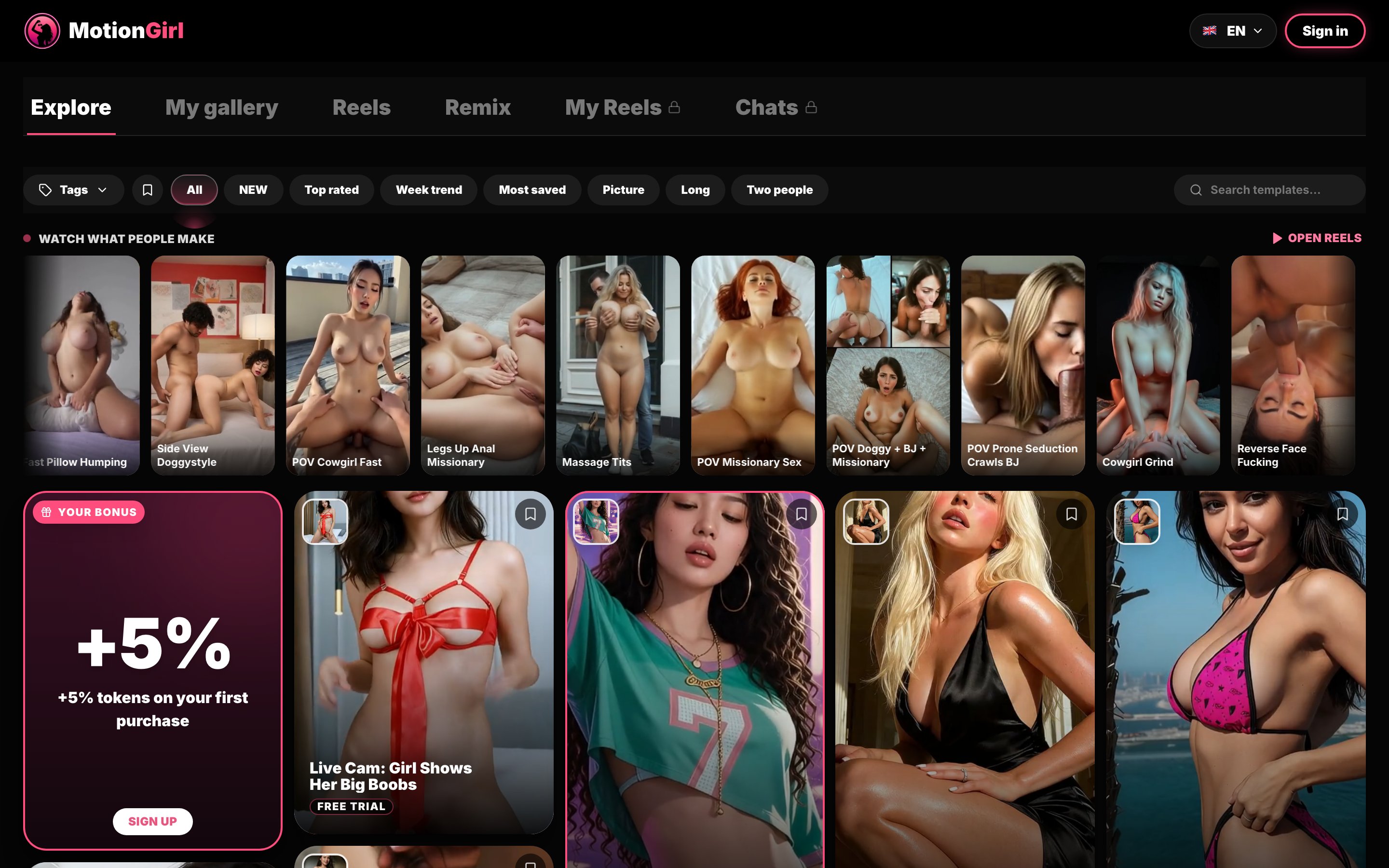
The homepage underneath is headed "AI porn video generator: turn one photo into a video." The navigation lists six destinations: Explore, My gallery, Reels, Remix, My Reels and Chats. The last two carry a lock icon for anonymous visitors. Explore is the catalogue itself, and it is where almost everything happens.
The site's own explainer describes the process in three steps. You pick a scene from the catalogue, add one clear photo of a consenting adult, and receive the video. The template supplies the movement and your photo supplies the person. There is no video input, no second angle and no training step. The finished clip lands in your collection when it is ready, and the site promises a video "in a couple of minutes."
That description matches what the interface shows. Clicking any template opens a window with the scene's name, an upload field, a length setting, a quality setting, an undress switch, a link to photo tips and a Start Generate button with the price in tokens printed beside it. Pressing Start Generate in a fresh session opens a Create account dialog instead of a render. Browsing the catalogue and opening templates is free for anyone, but generating is not.
The Template Catalogue
The plan cards on the pricing page promise access to "all 700+ video templates," and the catalogue on the homepage runs to 26 pages. Each template is shown as a moving cover, so you see the motion before you commit a photo. The site makes a point of this on its explainer page, and it is the most useful design choice on the whole site. A still thumbnail tells you nothing about pacing or camera angle. A looping preview tells you most of it.
Filters sit above the grid: a Tags menu, a saved-items toggle, and the tabs All, NEW, Top rated, Week trend, Most saved, Picture, Long and Two people. A search field on the right looks up templates by name. The Picture tab suggests that some templates produce a still image rather than a clip, and Long suggests longer scenes than the default, though neither was tested here.
The site also groups the catalogue into eleven scene pages, each with its own short description: sex, blowjob, POV, undress, solo, cumshot, missionary, nudes, cowgirl, doggystyle and anal. The undress page is described as "an AI undress video from one ordinary photo: the clothes come off on camera," with slow and fast reveals. The solo page promises one person on screen with no partner added, and the missionary page notes that the face stays in frame for most of the scene.
Two badges appear on the cards. Free Trial marks templates that a new account can use for its single trial generation. VIP marks templates tied to the top plan, a point the pricing page confirms by listing VIP template access as excluded on Basic and Pro. Template names are blunt and descriptive, and the grid leans heavily toward POV scenes, with a separate Two people filter for couple templates.
A strip near the top, titled "Watch what people make," shows a row of clips made by other users and links to the Reels feed. A bonus card in the grid offers 5 percent extra tokens on the first purchase.
Uploading a Photo and the Undress Option
The template window accepts one photo, as JPG, PNG or WebP, up to 10 MB. On the template opened for this review the length was set to 5 seconds and the quality to 720p, and the price beside the Start Generate button read 30 tokens. That figure matches the pricing page, which describes a 350-token pack as "about 11 videos."
The undress switch sits in the same window and adds 25 tokens. With it turned on, the same five-second clip costs 55 tokens. This is what earns MotionGirl a place among undress tools as well as video generators: the clothing removal is an option on ordinary scenes, not a separate product, and the dedicated undress shelf builds the reveal into the template itself. There is no still-image nudifier of the kind that returns an undressed version of the uploaded photo.
The explainer page gives clear advice on which photo to use. The best source is a recent picture of one person looking at the camera, with the face fully visible, in daylight or even indoor light. Phone selfies are said to work well. The things that go wrong most often are listed by name: sunglasses, strong beauty filters, a hand or hair across the face, a face turned sharply to the side, and group photos where the model has to guess which person you meant. The clothes, the room and the pose in your photo do not matter, because the scene decides those. If a result is close but not quite right, the site recommends a sharper picture of the same person before trying another scene.
That advice is specific and practical, and it is more than most sites in this category offer. It also tells you something about the system: the photo carries identity only, and everything else comes from the template. Whether the rendered face holds up through fast motion is the one question this review leaves open, since nothing was rendered for it.
Reels, Gallery and the Locked Features
Reels is a vertical feed of clips made by other users. Each clip carries Save and Share buttons and a "Make this with your photo" link that opens the template behind it. It works as a catalogue of real results rather than marketing renders, and it is the closest an anonymous visitor can get to judging output quality before paying. The clips were not reviewed frame by frame here, and they are the results users chose to share, not a random sample.
My gallery is where your own clips are stored. How long they stay there depends on the plan: three months on Basic, six on Pro and one year on VIP. Every plan card also lists "Save generated videos," so the storage limit applies to the online gallery and not to files you have already saved.
Remix, My Reels and Chats sit in the same navigation bar. My Reels and Chats are locked behind an account, and none of the three was explored for this review, so nothing is claimed about what they do. The footer also links to an API access page.
Pricing, Tokens and Payment
Pricing lives on the Premium page, which has two tabs: Subscription and Tokens. The subscription tab opens on the three-month billing period, which is cheaper per month, so the one-month figures below come from switching the tab. They are the cost of the shortest commitment, not the lowest advertised rate.
On one month, Basic is headlined at $11.99 and includes 300 tokens, HD video, five renders at once, three months of storage and priority over free users. Pro is $19.99 with 700 tokens, Full HD, ten renders at once, six months of storage and accelerated priority. VIP is $34.99 with 1,500 tokens, the quality level labelled High, fifteen renders at once, a year of storage, instant priority and the VIP templates. Basic also lists early access to new templates as not included.
The headline is not the amount you pay. Under each plan the page shows a total by payment method, and for one month of Basic that total is $14.99 by card, $12.99 in crypto or 909 Telegram Stars. Pro comes to $24.99 by card or $20.99 in crypto, and VIP to $43.74 by card or $35.99 in crypto. Crypto payments add 30 bonus tokens on top.
Longer terms cut the monthly price by 25 percent on three months and 50 percent on twelve. On the three-month tab Basic drops to $8.99 a month for 900 tokens, with a banner promising an extra free month, and the card total for the term is $33.74.
Token packs sit on the second tab: 350 tokens for $14.99, 1,000 for $26.99 and 3,000 for $64.49, which the page translates into about 11, 33 and 100 videos. The terms add an important condition: packs are sold on top of a running plan, "a way for a subscriber to generate more, not a way in," and checkout refuses them when no plan is active.
Put together, one month of Basic paid by card buys 300 tokens for $14.99, which is ten standard five-second clips at about $1.50 each, or five clips with the undress switch on. Tokens do not expire while the account stays open, so unused balance carries over into the next plan.
Account Rules, Refunds and Privacy
The Create account dialog offers three routes: Telegram, which the site advertises as one tap with no password and payment in Stars, Google, or email. There is a field for a promo code. A new account gets one free trial generation, limited to one per person, and the terms are frank about what it is: "what a trial buys is the demonstration," and the videos it stands for are rendered only once a plan is bought. The free trial, in other words, does not give you a file.
Plans are single payments for a fixed term. They do not renew automatically, there is no card on file, and when the term ends the plan lapses. Payment runs through Telegram's own payment rail or a cryptocurrency processor. That is unusually clean billing for an adult service.
Refunds are the other side of it. Payments are not refundable, whether for plan terms or token packs, used or unused. A generation that fails through the site's fault returns its tokens automatically, but an output you simply do not like counts as delivered. Reversing a Telegram Stars payment or filing a chargeback closes the account and takes back everything the payment granted.
On privacy, the explainer says uploaded photos are kept only as long as needed to make the video, and points to the privacy policy for detail. The terms state that one account system serves MotionGirl and a sibling site, sharing the token balance, plan and history between them. The upload rules are strict: only photos of adults who consented, with any breach leading to account termination and forfeited tokens.
Final Verdict
MotionGirl is a template machine and does not pretend to be anything else. The catalogue is large, every scene shows its motion before you commit, every render shows its price in tokens, and a plan simply stops at the end of its term rather than charging again. The photo advice is better than most competitors offer, and the undress switch adds a clothing reveal to almost any scene for 25 extra tokens.
The limits are just as plain. The free trial is a demonstration, not a clip you keep. The cheapest plan headlined at $11.99 costs $14.99 by card for ten standard clips, token packs only work alongside a plan, and nothing is refundable. Output quality is the part left untested here, and the Reels feed is the best free evidence of it before you pay. Users who want specific scenes with a chosen face and no prompt writing will find MotionGirl a transparent way to get them. Anyone hoping to describe a scene in their own words will be better served by AI porn generators that work from a text prompt.