


Most undress sites sell one button. My Undress AI sells a menu. The site calls its templates modes, sorts them into Image, Video and Audio-Visual, and gives each one a fixed recipe: a sample result, a default prompt, a price in credits and an upload field. You do not describe a scene in your own words. You pick a scene that already exists and supply the photo.
This review covers the mode catalogue, the image and video tools, the sign-in wall, the credit packs and what each generation costs, the payment options and the privacy rules. Every number comes from the site's own pages and its public pricing data as they stood in October 2026. No paid generation was run for this review, so the quality of the output is not assessed here, and the text says so wherever it matters.
How My Undress AI Works
The first visit opens behind an age gate. A short notice describes the site as a practice interface for fictional adult characters and asks the visitor to confirm they are 18 or older, with a Leave button as the alternative. One click on "I am 18 or older" opens the homepage.
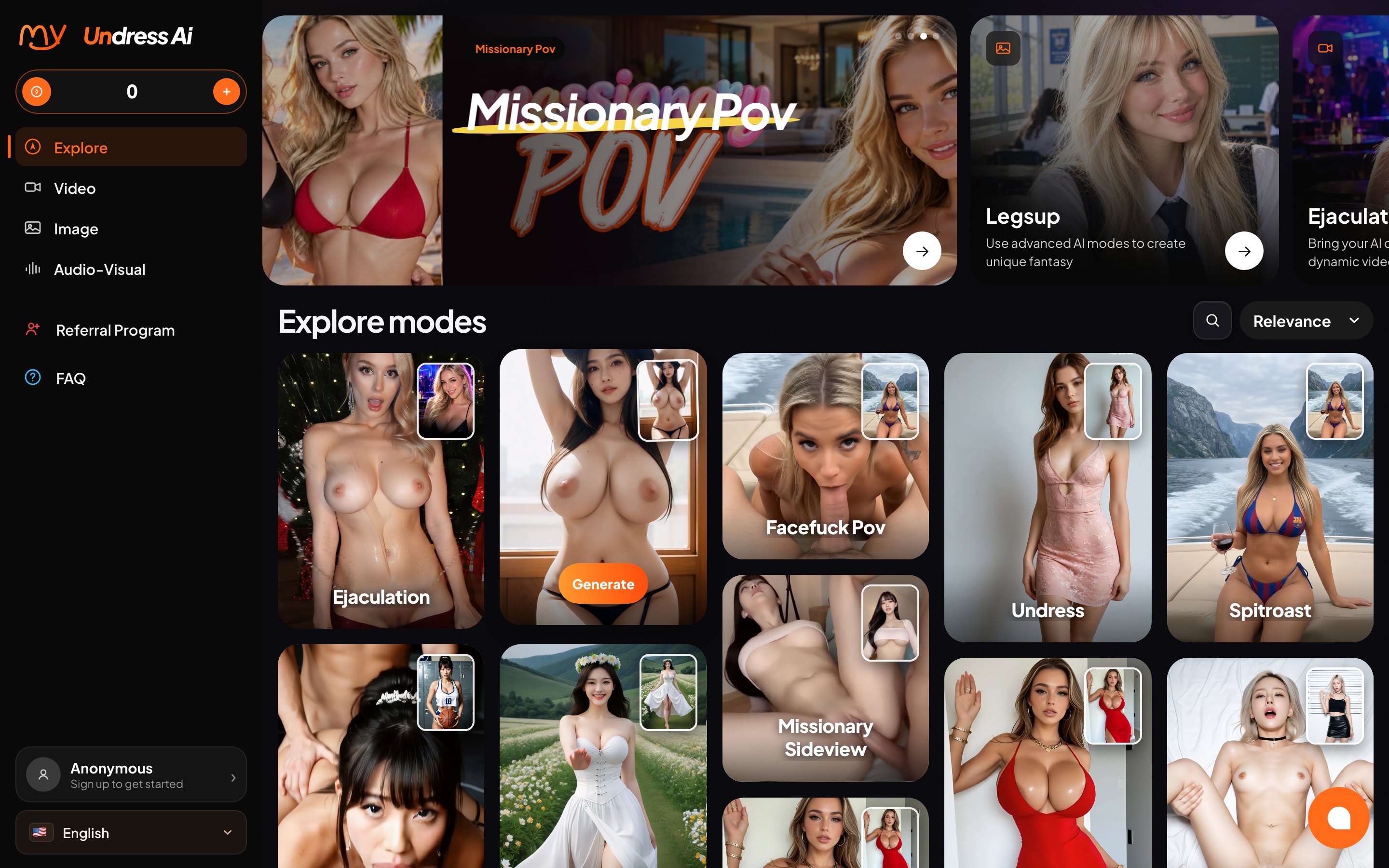
The homepage is mostly a showcase. A rotating banner promotes a few video modes, and below it sits a sorted grid of popular templates, each with a Generate button. The grid can be ordered by relevance, newest, trending today, this week or this month, most used, least used, most favorited or oldest first. A link at the bottom reads "Explore 649 modes."
The left menu holds the rest of the site: Explore, Video, Image, Audio-Visual, Referral Program and FAQ. A credit counter in the corner shows 0 for anonymous visitors, and the account area reads "Anonymous, Sign up to get started."
Opening a mode brings up a small panel. It shows a sample result, an Upload button, a quality setting, the prompt and a Settings menu, with a Continue button underneath. On the flagship Undress mode the quality reads Ultra and the price reads 2 credits. The default prompt is visible and editable; for Undress it asks the model to make the subject completely nude. The panel is the same on every mode, so once you have used one you know how all of them work.
The Mode Catalogue
The catalogue is the product, and its size is the first thing the site advertises. The 649 modes cover a wide range: simple clothing removal, partial reveals, outfit swaps, and a long list of explicit poses and sex acts. Each card carries a title, a sample image and, on newer additions, a NEW badge.
Popularity is visible in the data behind the grid. The Undress image mode leads the image list with more than 112,000 recorded generations. That count says the mode is used heavily. It does not say how good the results are, and it should not be read as a quality score.
Template names are literal. A mode called Bikini or Bath Towel does what the name says, and the explicit modes are named by the act they depict. That makes the grid quick to scan, although the sheer number of near-duplicates, several titles appear more than once with different sample images, means the sort options do more work than they would on a smaller site.
Every mode is a fixed pathway. You can edit the prompt, but you cannot turn an image mode into a free-form scene builder. Anyone who wants to describe a setting, a camera angle or a body type from scratch is in the wrong place. Anyone who wants a predictable result from a known template will find the structure useful.
Image Modes and Dual Image Remix
The Image section is where the undress function lives. Undress is the first mode in the list and the one the site is named after: upload one photo, press Continue, and the result is a nude version of the same picture. Neighbouring modes change the outcome rather than the method. Topless, Lingerie, Bikini, Bath Towel, Leopard Bikini and JK Uniform replace or reduce clothing in a specific way. Xray simulates see-through fabric. Further down the list come pose and act templates such as Missionary POV, Doggystyle Sideview and Cum On Body.
A separate group is labelled Dual image. These Remix modes take two uploads instead of one and combine them into a single scene according to the template, for example Remix Kiss, Remix Cowgirl or Remix Dress. They are the most complex tools in the image section, and the most dependent on good source pictures.
Quality comes in two levels. Ultra is the default and costs 2 credits per image. The lower setting costs 1.5 credits. Because nothing was generated for this review, the difference between the two levels, and the realism of either, remains unverified.
The site states its own limits on the sign-in window that opens before the first generation: users must be 18 or older, must not use someone else's photos without permission, and are fully responsible for the images they create. The terms go further and forbid generating images of anyone without their explicit consent or of anyone who is a minor. In practice that leaves your own photos, photos of consenting adults, and AI-generated faces as the only legitimate input.
Video and Audio-Visual Modes
The Video section applies the same idea to motion. You upload a still image and the chosen mode animates it into a short explicit clip. The list runs from Undress and Nude Posing to Missionary POV, Blowjob, Reverse Cowgirl, Titty Flash and a TikTok Trend template, with several Dual image Remix variants among them. The mode decides the action and the framing. You supply the starting picture.
A video costs 8 credits at standard quality and 9 at the higher setting. That is four to six times the price of an image, which is the normal ratio in this category.
Audio-Visual is a third section that adds sound to the clip and offers longer runtimes. The base price is 10 or 12 credits depending on quality. Length is added on top: a 5-second clip costs nothing extra, 10 seconds adds 2 credits, 15 seconds adds 4 and 20 seconds adds 6. The most expensive single generation on the site, a 20-second Audio-Visual clip at the higher quality, therefore costs 18 credits.
Because no clip was generated for this review, the smoothness of the animation, the quality of the sound and how well a face survives the motion all remain open questions.
Sign-In, Free Credits and Payment
Browsing is open to everyone. Generating is not. Pressing Continue on any mode in a fresh session opens a Sign In window with three options: Google, Telegram and email. The window repeats the age and consent rules and notes that signing in means accepting the terms, the use policy and marketing emails.
The free offer is small. The FAQ says a newly registered user receives one free image generation credit, worth one point. An image costs at least 1.5 credits, so on the published numbers the welcome credit does not cover a full image on its own. Whether the site makes an exception for the first generation could not be checked without an account, and nobody should count on a free result.
Payment is broad. The FAQ lists international credit cards, Stripe, PayPal, Apple Pay, Google Pay, virtual currency, Telegram token payment, a local cash wallet, WeChat Pay and Alipay. If a payment goes through and the balance does not update, the FAQ asks the user to send the receipt to customer support, which runs through a live chat widget on every page and a Telegram account.
A referral program rounds out the account side. Users who invite friends through a personal link receive bonus credits when those friends register and top up. The exact bonus is not published on the public pages.
Credit Packs and Pricing
My Undress AI sells credits only, in five one-time packs:
- Starter: 50 credits for $20
- Value: 150 credits for $40
- Popular: 300 credits for $60
- Pro: 900 credits for $120
- Ultimate: 4,000 credits for $300
The terms are explicit that there are no subscriptions, recurring charges or automatic rebills, and the FAQ adds that no cancellation is ever needed. For a category where forgotten monthly plans are the usual complaint, that is a real advantage.
The packs drop steeply in price per credit. Starter works out to 40 cents a credit, Popular to 20 cents and Ultimate to 7.5 cents. Translated into output, the $20 Starter pack buys 25 Ultra images or 33 at the lower setting, or six standard videos. The $60 Popular pack buys 150 Ultra images or 37 standard videos. The Starter pack is the expensive way in, and the sensible first purchase for anyone who expects to come back is Value or Popular.
The terms also promise that every generation costs a fixed number of credits shown before you generate, which matches what the mode panel displays. Refunds are narrow. A request has to arrive within 24 hours of payment, it is refused once more than 20 credits have been used, and purchases made with cryptocurrency are final. A refunded purchase removes its remaining credits at once.
Privacy, Retention and Safety Pages
Generated files are private by default. The FAQ says uploads and downloads are encrypted, results are visible only to the account that made them, and everything is deleted automatically and permanently after five days. There is no long-term gallery: anything worth keeping has to be downloaded within that window.
Account deletion is self-service from the personal center. The FAQ warns that a deleted account loses all credits and resources and that the same account cannot be registered again.
The footer lists a full set of legal pages: privacy, terms, usage policy, complaint policy, content removal policy and an AML policy, plus a Report Non-Consensual Content page, an online safety page and an 18 U.S.C. 2257 exemption statement. Uploading illegal material, including anything involving minors, leads to suspension, loss of all credits and no refund, according to the FAQ. The operator named in the footer is MegaMarket Trading LLC, registered in the Dubai Silicon Oasis free zone in the United Arab Emirates.
Final Verdict
My Undress AI is a large, well-organised template machine. The catalogue of 649 modes is easy to browse, every mode shows its price before you commit, the credit packs are one-time purchases that never renew, and generated files disappear after five days instead of piling up on someone else's server. Those are solid foundations in a category where hidden subscriptions and vague pricing are common.
The weak points are on the entry ramp. The single welcome credit does not cover a full image, the $20 Starter pack charges twice as much per credit as the $60 pack, and the refund window closes after 24 hours or 20 used credits, whichever comes first. Because no generation was run for this review, the realism of the undress images and the quality of the clips remain the open question. The sensible test is a Value pack, a handful of images of yourself, a consenting adult or an AI-generated face, and a judgment based on what comes back. Users who like the template approach will find My Undress AI transparent and flexible on payment. Users who want to write their own scenes from scratch should look at prompt-based generators instead.